
PRODUCTIVITY · ODOO
Repeatedly entering the same language, category, or other field value slows down everyday work. Odoo's built-in defaults can fill in suitable values when you create a record, reducing repetitive entry without requiring a custom module.
What does a default value actually do?
A default is a starting value for a new record, not a rule that locks the field. Users can still change editable fields, and existing records are not updated retroactively. Start with a value that is usually correct for the intended user and company.
Set a default from a form
This example uses the Language field on a contact. The same approach works for eligible fields on other forms, although available fields and labels depend on your configuration and access rights.
- Enable developer mode in Settings. If you cannot access the relevant technical tools, ask your system administrator.
- Open a new contact form and choose the language you want to use as the default. Current forms are normally editable immediately; you do not need to look for the older Edit button.
- Open the developer tools menu and select Set Default Values.
- In the Default field list, choose Language and confirm that the displayed value is the one you intended.
- Choose whether the default applies only to you or to all users, then select Save Default. The form-based setting is saved for the current company.
- Open another new contact form and check the result. Test with another user or company if the setting is intended for a wider scope.
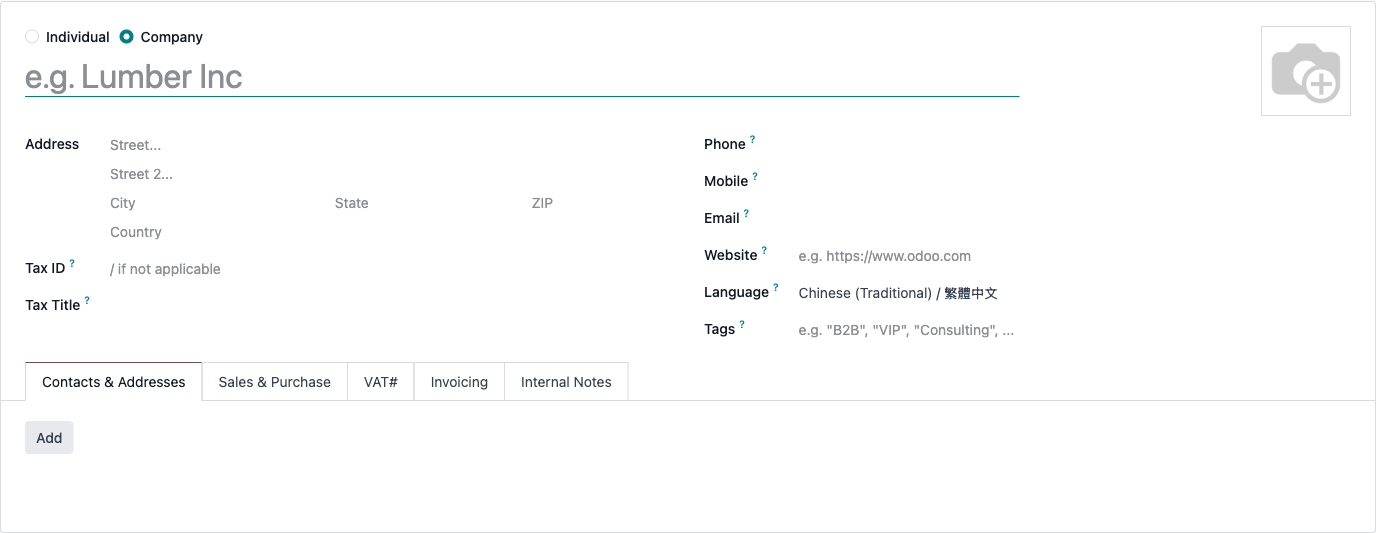
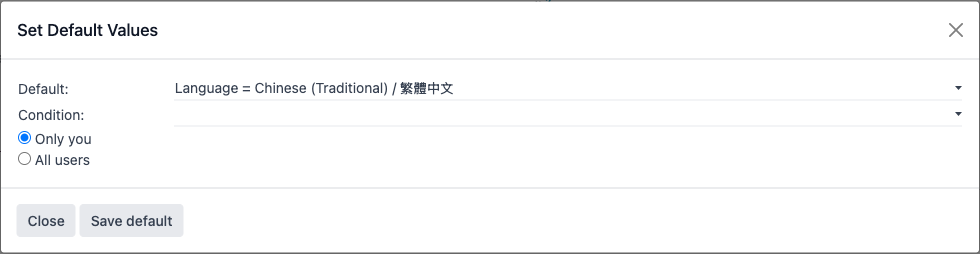
Saving a default changes configuration. Start with a user-specific default in a test environment, then review the impact before applying it to everyone. Do not create a real contact just to test the setting.
Manage user and company scope
Administrators can review saved entries under Settings → Technical → Actions → User-defined Defaults. Check the model, field, user, company, and any condition before changing or removing an entry.
An empty User field means the entry is not limited to one user; an empty Company field means it is not limited to one company. A company-specific or user-specific entry may take precedence over a broader default. Test the actual combinations your team uses.
The technical menu stores values in JSON format. For a relational field, the stored value may be a record ID rather than its displayed name. Have an administrator verify the field type and value; copying a name or an ID from another database can produce an incorrect setting.
Why is a field missing from the list?
The form dialog does not offer every field. Empty, hidden, read-only, attachment, password, and multi-record relationship fields are excluded. A blank value, zero, or an unchecked checkbox may also be omitted. Conditions are only available for fields designed to support them.
If the field is missing, do not assume that adding Studio or a third-party module is necessary. First check the form and permissions. For a valid setting the dialog cannot represent, ask an administrator to evaluate the technical defaults menu or the appropriate business configuration.
Why does a saved default not appear?
- Make sure you are creating a new record, not editing an existing one.
- Check the active company and user, and look for a more specific default or a saved condition.
- Try the same creation path your team uses. A menu action or another workflow can supply its own starting values.
- Selecting a customer, product, or other related record can recalculate fields. A computed value or business rule may replace the initial default.
For example, a quotation's sales team or payment terms may come from the customer and other sales settings. Do not treat a form default as a guaranteed override of those rules. Confirm the complete workflow before rolling it out.
When should you use something else?
Use a default for a stable starting value that people can adjust. Use the relevant app's settings, templates, or business logic when the value must depend on the customer, product, or transaction. Requirements such as always enforcing one value or calculating a date relative to today need a different solution.
RichSoda can help you distinguish simple defaults from workflow changes, keeping the setup easy to use and maintain.
Discuss your Odoo workflow with RichSoda
References: Odoo's guide to user-defined defaults; native form defaults implementation; default-value resolution.